The short answer
The best Bible app for iPhone for understanding what you read is Bible Studies for Women, with guided explanations and notes kept on the phone ($7.99 a month, no free trial, no widgets). The best free iPhone Bible app is YouVersion, with Home Screen widgets, Siri audio and no ads. For free study, Blue Letter Bible; for a verse on your Lock Screen or Apple Watch, Bible Widgets.
- Best for understanding what you read: Bible Studies for Women, the Berean Standard Bible with plain-words explanations and a journal stored on your iPhone ($7.99 a month or $79.99 a year, no free trial). No widgets or Watch app.
- Best free iPhone Bible app: YouVersion, with 3,500+ versions, Home Screen widgets, Siri for audio chapters and apps for iPad and Apple TV.
- Best free for study on iPhone, iPad and Mac: Blue Letter Bible, with no in-app purchases and an App Privacy label that lists only data not linked to you.
- Best offline study library: Olive Tree, which downloads Bibles and study resources and syncs across iPhone, iPad and Mac.
- Best for your Lock Screen and Apple Watch: Bible Widgets or Daily Bible Verse Widget, which show a verse without opening an app.
Members of the Word makes Bible Studies for Women, one of the apps in this guide. We checked every other app's price and features on its App Store listing, Google Play listing or official site on September 29, 2026. Prices are in US dollars and can vary by country.
The main editorial guide that ranks for this search was last updated in June 2020. The rest of the results are forum threads, a YouTube video and App Store listings.
On an iPhone, a few things decide which Bible app fits: whether it has widgets or an Apple Watch app, whether it reads offline, what the App Store charges, and whether your notes live on the phone or in an online account.
We checked every app on the App Store on September 29, 2026, including its compatibility list and App Privacy label. We make Bible Studies for Women and placed it first; it has no widgets or Watch app, and we say so.
At a glance
| App | App Store price and trial | iPhone extras | Offline | Where notes are kept |
|---|---|---|---|---|
 Bible Studies for Women Bible Studies for Women | $7.99/mo or $79.99/yr, no free trial | None: no widgets or Apple Watch app | Yes, the whole Bible | On the iPhone only, no account. Export as text |
 YouVersion Bible App YouVersion Bible App | Free, no in-app purchases | Home Screen widgets, Siri audio, iPad, Apple TV, Vision Pro | Select versions | A free YouVersion account |
 Blue Letter Bible Blue Letter Bible | Free, no in-app purchases | iPad and Apple silicon Mac | Not stated. ESV, LSB and NASB are free downloads | Cloud backup. Preferences backed up to iCloud |
| Bible App by Olive Tree | Free. Study Packs $2.99 to $5.99/mo | iPad, with sync to Mac | Yes, Bibles and resources | Synced across iPhone, iPad and Mac |
 Logos Bible Logos Bible | Free. Plus $4.99/mo, Premium $9.99/mo | iPad | Not stated | Synced with a free account |
 Dwell: Audio Bible Dwell: Audio Bible | $9.99/mo or $59.99/yr after a 7-day free trial | iPad and Apple silicon Mac | Audio downloads | Not stated |
 ESV Bible ESV Bible | Free. $3.99/mo or $39.99/yr subscription | iPad, Apple silicon Mac, Family Sharing | Not stated | ESV.org, via a free account |
| Bible Widgets: Verses & Prayer | Free with ads. Premium prices vary, $14.99 to $59.99 a year | Home and Lock Screen widgets, Apple Watch, iPad, Mac | Saved content | Not a notes app |
 Daily Bible Verse Widget Daily Bible Verse Widget | Free. Premium $2.99/wk to $99.99 lifetime | Home and Lock Screen widgets, Apple Watch, iPad, Mac | Not stated | Not a notes app |

Our app
Members of the Word
1. Bible Studies for Women
Best for understanding what you read on your iPhone, with notes that stay on the phone
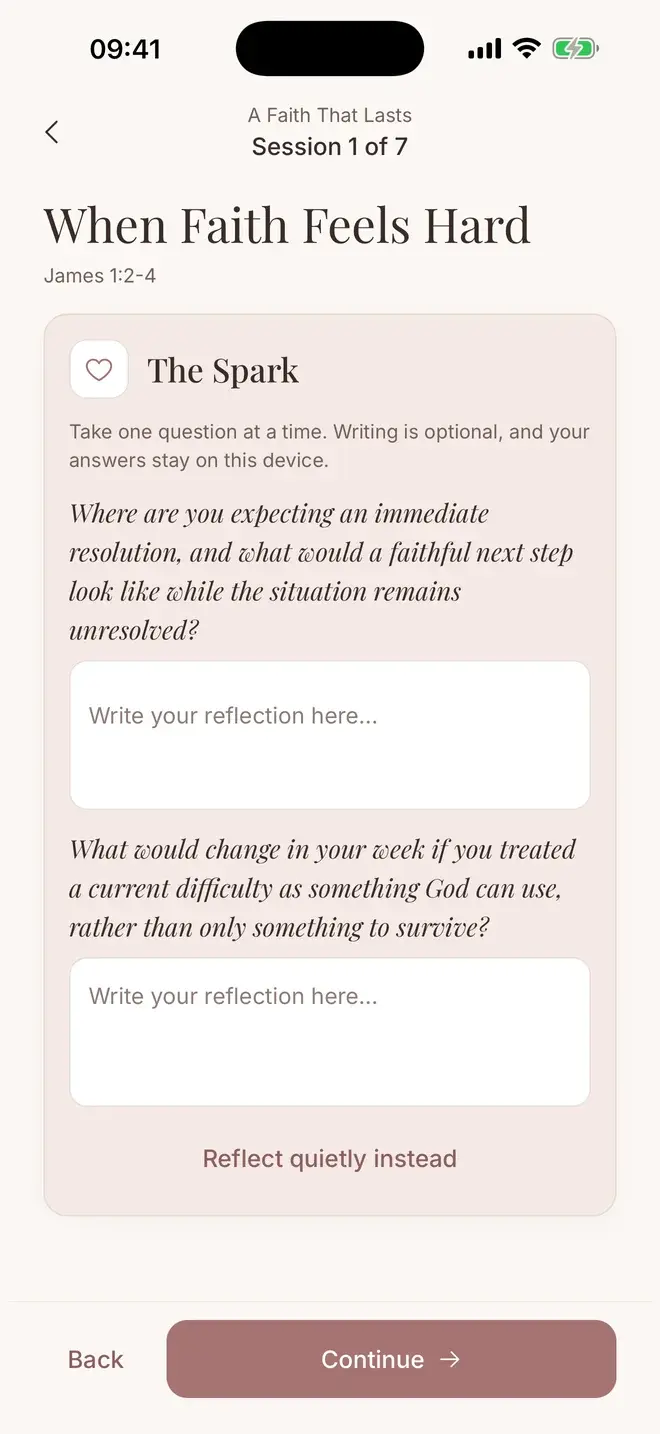
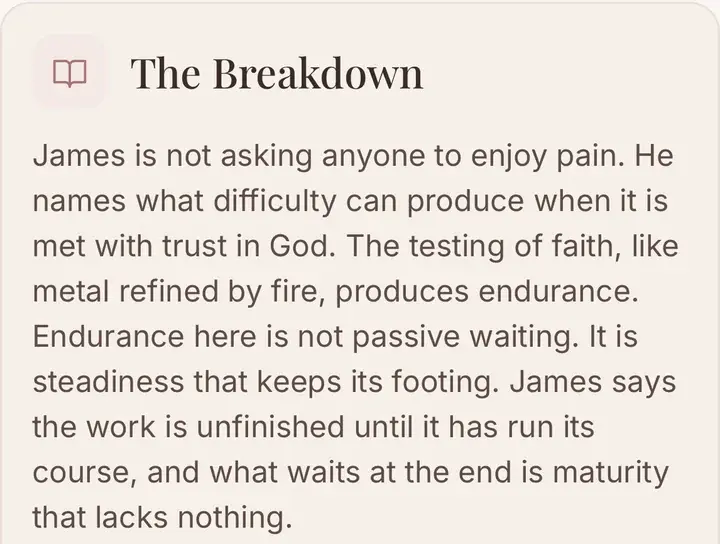
Bible Studies for Women puts a full Bible and guided studies on your iPhone. When a passage is hard, The Breakdown explains it in plain words with context and translation notes.
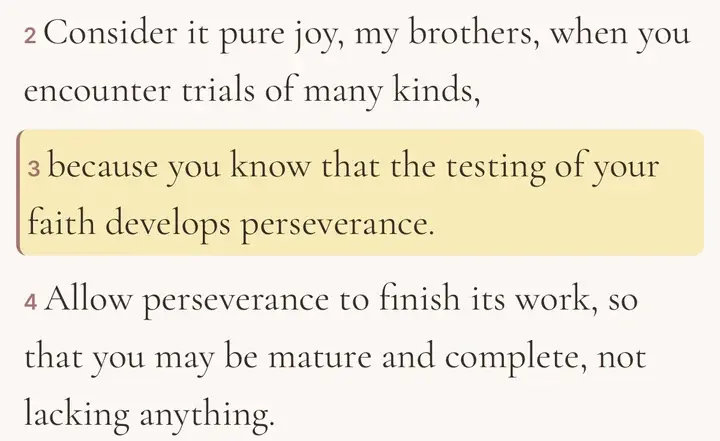
The Bible is the complete Berean Standard Bible, readable offline. You can set type size, line spacing and reading theme, search by word, phrase or reference, and pick up where you left off.
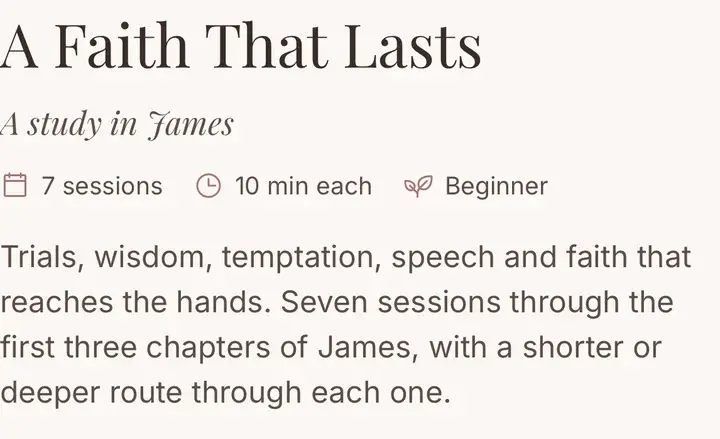
Studies run at about 5, 10 or 20 minutes, as routes through the same study, on the days you choose. Reminders are set on the phone itself.
Notes, highlights and reflections are stored on your iPhone only, with no account, no server, no ads and no third-party analytics. Export everything as a plain text file at any time.
- Best for
- understanding what you read on your iPhone, with notes that stay on the phone
- Price
- $7.99 a month or $79.99 a year. No free trial
- Platforms
- iPhone and Android
What stands out
- The full Berean Standard Bible, 66 books, offline
- Type size, line spacing and reading theme settings
- Plain-words explanations in every study session
- Twelve guided plans plus hundreds of verse studies by subject
- A private journal stored on the phone, exportable any time
Worth knowing
- It has no Home Screen or Lock Screen widgets and no Apple Watch app. If you want a verse on your Lock Screen, YouVersion or a widget app below does that.
- It has one translation, the BSB, and no audio. It costs $7.99 a month or $79.99 a year on the App Store, with no free trial.
- Your writing is not in iCloud: cloud backup is off, so export it or rely on your iPhone's own device backup. We make this app, which is why we are clear about the limits.

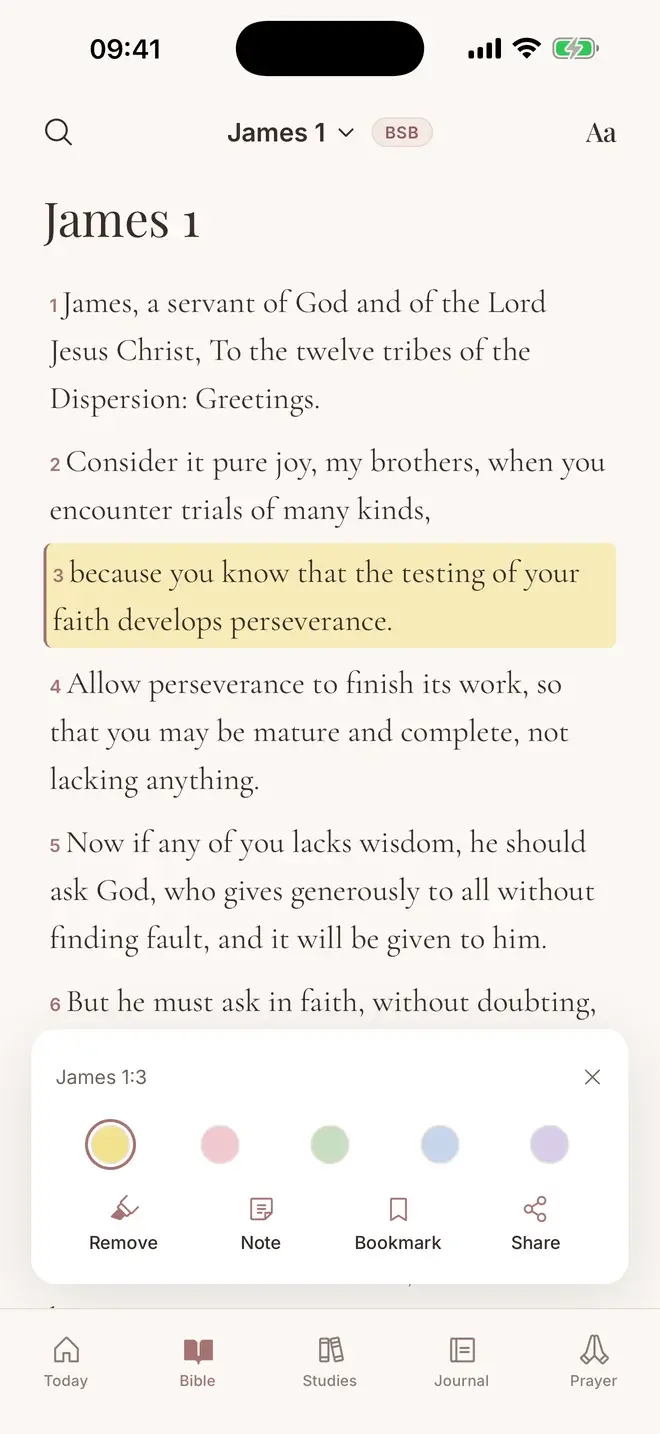
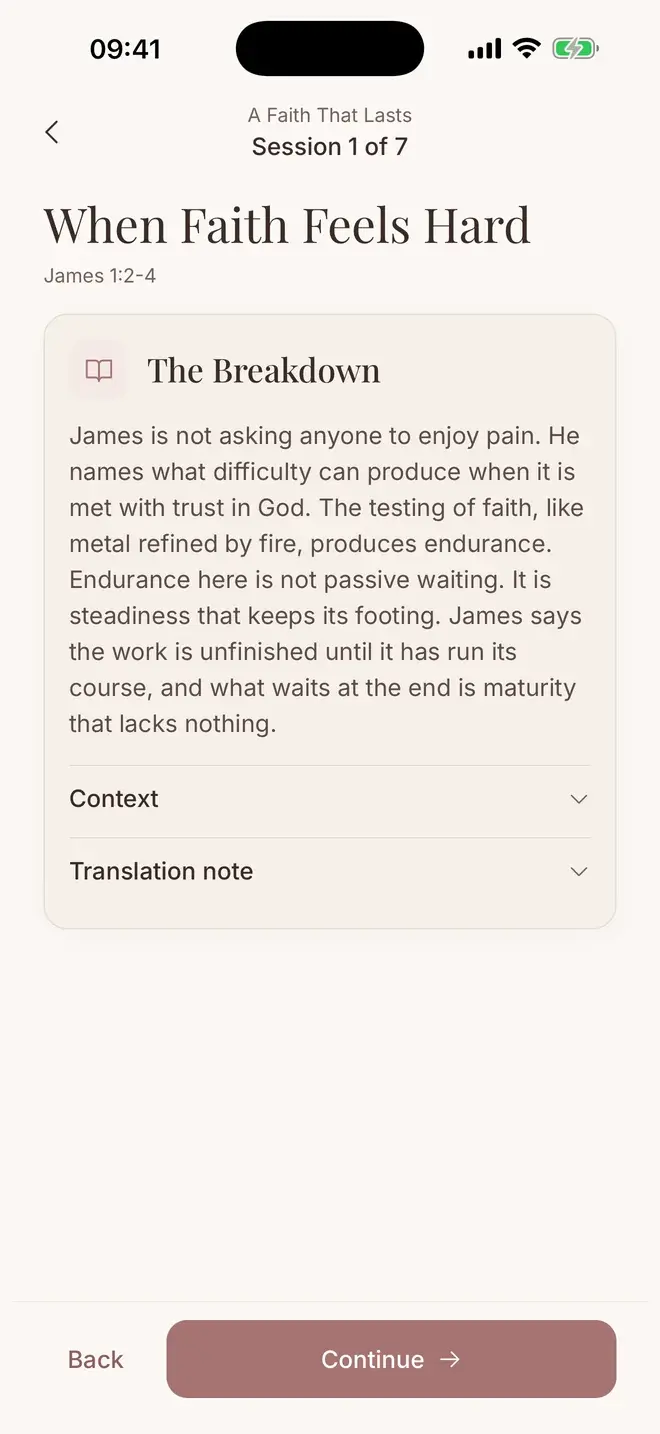
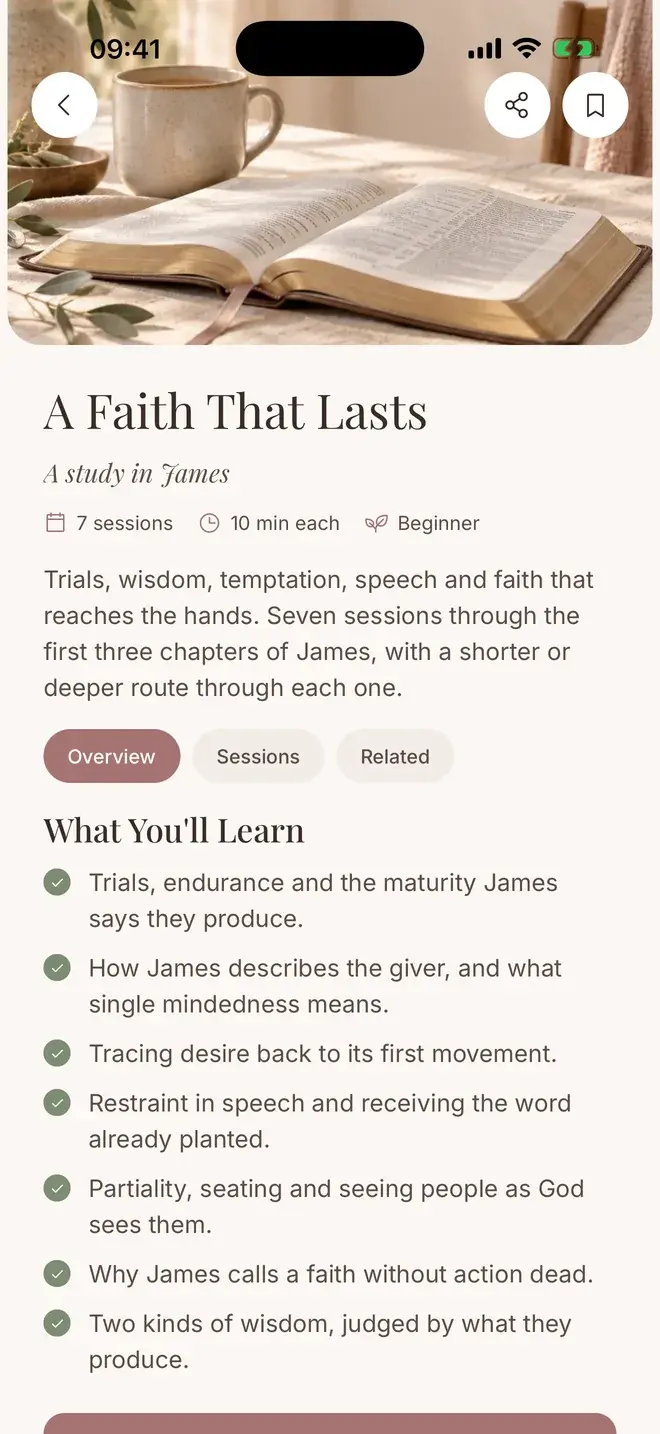
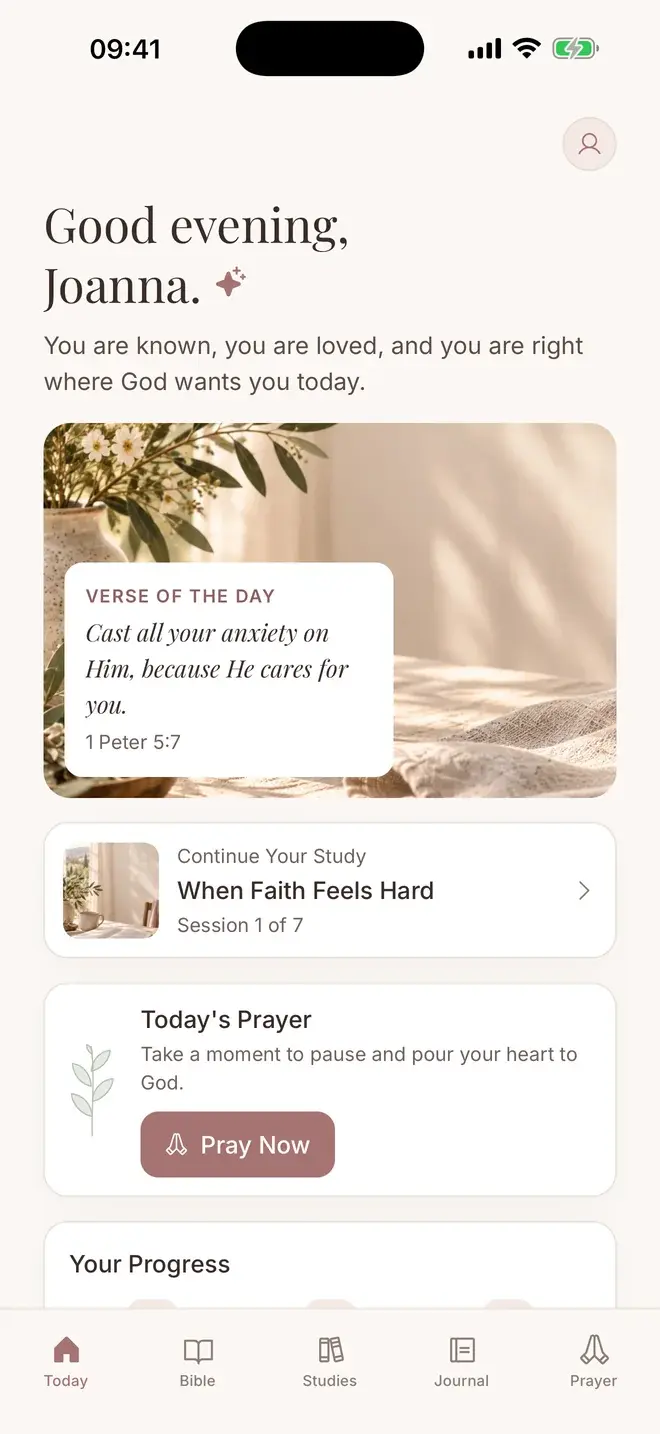

A Bible you can make your own.
Highlight, note and bookmark any verse across the whole Bible, offline.

2. YouVersion Bible App
Life.Church
Best for a free iPhone Bible with widgets, Siri audio and the most translations
YouVersion is the best free Bible app for iPhone. It is listed simply as "Bible" on the App Store, with 3,500+ versions, thousands of reading plans and no ads.
Of the full Bible apps here, it uses the most iPhone features: Home Screen widgets for the Verse of the Day and your streak, Siri to play Bible audio chapters, and versions for iPad, Apple TV and Apple Vision Pro.
- Best for
- a free iPhone Bible with widgets, Siri audio and the most translations
- Price
- Free. No ads or in-app purchases
- Platforms
- iPhone, iPad and Android
What stands out
- Verse of the Day, Verse of the Day Images and Streaks widgets
- Ask Siri to play Bible audio chapters
- iPad, Apple TV, Apple Vision Pro and iMessage apps
- Offline reading for select versions
- Notes, highlights and bookmarks synced with a free account
Worth knowing
- There is no Apple Watch app, and YouVersion's help article does not mention Lock Screen widgets.
- Its App Privacy label lists data linked to you, such as email address and user content, which fits syncing notes to an account. Study notes are thin next to Olive Tree or Logos.
YouVersion Bible App on App Store YouVersion Bible App on Google Play YouVersion Bible App on Website

3. Blue Letter Bible
Blue Letter Bible
Best for free, deep study on iPhone, iPad and Mac
Blue Letter Bible is free with no in-app purchases, and the same App Store app runs on iPhone, iPad and Macs with Apple silicon.
It links a Hebrew and Greek lexicon to every verse, with 30+ translations, commentaries and concordances. Its App Privacy label lists only data not linked to you.
- Best for
- free, deep study on iPhone, iPad and Mac
- Price
- Free. No ads or in-app purchases
- Platforms
- iPhone, iPad, Mac and Android
What stands out
- Hebrew and Greek lexicon on every verse
- CSB installed, with ESV, LSB and NASB as free downloads
- Text and audio commentaries, plus audio Bibles
- Notes and highlights with cloud backup
- Preferences backed up and restored through iCloud
Worth knowing
- Its tool-rich screens can feel technical for a first-time reader.
- It has fewer reading plans and devotional features than YouVersion.
Blue Letter Bible on App Store Blue Letter Bible on Google Play Blue Letter Bible on Website
4. Bible App by Olive Tree
Gospel Technologies
Best for an offline study library that syncs across iPhone, iPad and Mac
Olive Tree downloads Bibles and study resources to the device, so your whole library works offline on a flight or with no signal.
Its Study Center follows the passage you are reading, and tapping a verse number compares it across every translation you have installed. Notes sync across iPhone, iPad and Mac.
- Best for
- an offline study library that syncs across iPhone, iPad and Mac
- Price
- Free app. Study Packs $2.99 to $5.99 a month, resources sold individually
- Platforms
- iPhone, iPad and Android
What stands out
- Five free translations: ESV, NIV, KJV, NKJV and CSB
- Study Center beside the text
- Verse compare across installed translations
- Full offline Bibles and resources
- Notes and highlights synced across iPhone, iPad and Mac
Worth knowing
- The best resources are paid: the ESV Study Bible is $47.99 on the App Store.
- The App Store lists iPhone, iPad and Vision Pro for this app, not Mac, although the listing mentions sync with Mac.
Bible App by Olive Tree on App Store Bible App by Olive Tree on Google Play Bible App by Olive Tree on Website
5. Logos Bible
Faithlife
Best for research and teaching on iPhone and iPad
Logos gives you 40+ free Bibles and books with a free account, including commentaries and the Faithlife Study Bible.
Its Study Assistant answers questions using only your Logos books, with limited free uses. It needs a recent iPhone: the App Store lists iOS 18.6 or later.
- Best for
- research and teaching on iPhone and iPad
- Price
- Free. Plus $4.99 a month or $49.99 a year. Premium $9.99 a month or $99.99 a year
- Platforms
- iPhone, iPad and Android
What stands out
- 40+ free Bibles and books
- Study Assistant and Smart Search (limited free uses)
- Factbook on people, places and ideas
- Custom reading plans
- Notes that sync across devices
Worth knowing
- Most of the library and more AI use sit behind Plus or Premium, and Bibles such as the ESV are $9.99 each.
- It is built for deep study, so it is heavier than a simple daily reader.
Logos Bible on App Store Logos Bible on Google Play Logos Bible on Website

6. Dwell: Audio Bible
Dwell App, LLC
Best for listening to Scripture on your iPhone, with offline downloads
Dwell narrates the whole Bible with 20+ voice recordings in 14 translations, with Read Along text that scrolls with the narrator.
Downloads play offline, and sleep mode suits listening at night. The App Store lists iPhone, iPad and Apple silicon Macs.
- Best for
- listening to Scripture on your iPhone, with offline downloads
- Price
- $9.99 a month or $59.99 a year after a 7-day free trial
- Platforms
- iPhone, iPad, Mac and Android
What stands out
- 20+ voice recordings in 14 translations
- Read Along text in sync with the narrator
- 75+ listening plans
- Sleep mode and Repeat and Reflect
- Downloads for offline listening
Worth knowing
- There is no free tier beyond the 7-day trial, and the App Store also lists a $69.99 yearly option.
- Its App Privacy label includes "Data Used to Track You".
Dwell: Audio Bible on App Store Dwell: Audio Bible on Google Play Dwell: Audio Bible on Website

7. ESV Bible
Crossway
Best for ESV readers who want to share one subscription with family
Crossway's ESV app is a clean reader with a distraction-free mode, 50+ reading plans and narrated audio.
It supports Family Sharing on the App Store, so the subscription for study Bibles and commentaries can be shared with your family group. Notes sync with ESV.org through a free account.
- Best for
- ESV readers who want to share one subscription with family
- Price
- Free. Subscription $3.99 a month or $39.99 a year
- Platforms
- iPhone, iPad, Mac and Android
What stands out
- Distraction-free reader mode
- ESV Global Study Bible free
- 50+ reading plans
- Family Sharing for the subscription
- Runs on iPhone, iPad and Apple silicon Macs
Worth knowing
- It is ESV only.
- The iPhone app was last updated in September 2025, over a year before our check.
ESV Bible on App Store ESV Bible on Google Play ESV Bible on Website
8. Bible Widgets: Verses & Prayer
Monkey Taps
Best for a verse on your Lock Screen and Apple Watch
Bible Widgets is not a Bible reader. It puts customizable verses and prayers on your Home Screen and Lock Screen, so you see Scripture each time you unlock your phone.
The App Store lists an Apple Watch version (watchOS 9.6 or later), and saved content stays available offline.
- Best for
- a verse on your Lock Screen and Apple Watch
- Price
- Free with ads. Premium prices vary on the App Store, $14.99 to $59.99 a year
- Platforms
- iPhone, iPad, Apple Watch and Android
What stands out
- Home Screen and Lock Screen widgets
- Apple Watch app
- Scheduled daily reminders
- Favorites, themes and custom background photos
- Share verses as images
Worth knowing
- It mixes verses with general quotes and affirmations, so not every card is Scripture.
- The free version has ads, and its App Privacy label lists data used to track you, including identifiers and usage data.
Bible Widgets: Verses & Prayer on App Store Bible Widgets: Verses & Prayer on Google Play

9. Daily Bible Verse Widget
Daniel Ni
Best for one simple verse on your Lock Screen and Watch, Apple devices only
Daily Bible Verse Widget shows a new verse each day on your Home Screen or Lock Screen, or a favorite verse you pin.
The App Store lists an Apple Watch version (watchOS 11.6 or later), and its App Privacy label lists only data not linked to you.
- Best for
- one simple verse on your Lock Screen and Watch, Apple devices only
- Price
- Free. Premium from $2.99 a week to $99.99 lifetime
- Platforms
- iPhone, iPad and Apple Watch
What stands out
- A new verse every day
- Home Screen and Lock Screen widgets
- Apple Watch app
- Pin a favorite verse
- Share verses by text or social apps
Worth knowing
- The listing does not name a translation, and there is no Android version.
- Weekly billing ($2.99 to $4.99) adds up if left running; yearly is $29.99 to $39.99.
Daily Bible Verse Widget on App Store Daily Bible Verse Widget on Website
What matters in a Bible app on iPhone
Most Bible apps run on both iPhone and Android, so the iPhone-specific questions are the ones that separate them.
- Widgets: YouVersion has Home Screen widgets. Bible Widgets and Daily Bible Verse Widget add Lock Screen widgets too. Bible Studies for Women has none.
- Apple Watch: only the two widget apps list a Watch version. None of the full Bible apps here does.
- iPad and Mac: all eight other picks run on iPad. Blue Letter Bible, Dwell and ESV Bible also run on Macs with Apple silicon.
- Offline: Olive Tree, Bible Studies for Women and Dwell (for audio) state full offline use. YouVersion works offline for select versions.
- Where notes are kept: most apps sync notes to an online account. Bible Studies for Women keeps them on the iPhone with no account and no iCloud sync.
App Privacy labels, compared
Every App Store page has an App Privacy section, filled in by the developer and not verified by Apple. Here is the top level of each label on September 29, 2026.
- Data Not Collected: Bible Studies for Women.
- Data Not Linked to You only: Blue Letter Bible and Daily Bible Verse Widget.
- Data Linked to You, no tracking: YouVersion, Olive Tree, Logos and ESV Bible, which all sync notes to an account.
- Data Used to Track You: Dwell, Bible Widgets and #Bible, and also Bible Gateway.
Verse widget apps vs full Bible apps
Widget apps put a verse where you will see it, but they do not replace a Bible. Pair one with a reader if you want both.
[#Bible - Verse of the Day](https://apps.apple.com/us/app/bible-verse-of-the-day/id1255711035) is another popular iPhone option with a Home Screen widget and devotionals. It also includes an AI Bible Chat, and its patron prices range from $1.99 to $59.99.
For the full comparison across iPhone and Android, see our guide to the best Bible apps.
Which one should you choose?
You want to understand what you read, with notes on your iPhone only
Bible Studies for Women. Plain-words explanations in every study, and your writing stays on the phone.
You want the best free Bible app, with widgets
YouVersion Bible App. YouVersion is free with no ads, and adds widgets and Siri audio.
You want free study tools on iPhone, iPad and Mac
Blue Letter Bible. Lexicons and commentaries, free, on all three.
You want your study library offline
Bible App by Olive Tree. Bibles and resources download to the device.
You want to listen on your iPhone
Dwell: Audio Bible. For listening, Dwell is a stronger choice than our app, with offline downloads.
You want a subscription the family can share
ESV Bible. It supports Family Sharing on the App Store.
You want a verse on your Lock Screen or Apple Watch
Bible Widgets: Verses & Prayer. Home and Lock Screen widgets and a Watch app.
How we chose
We started from the apps that rank for iPhone Bible app searches today and the widget apps readers find in the App Store, then checked each current App Store listing on September 29, 2026.
For every app we recorded the App Store price and trial, widgets, Apple Watch, iPad and Mac support, offline reading, where notes are kept and the App Privacy label. Where a listing did not say, we wrote "Not stated".
We make Bible Studies for Women and placed it first because it is the pick here for understanding what you read, with notes kept on the phone. It has no widgets or Watch app, and YouVersion is the better free choice.
Frequently asked questions
What is the best free Bible app for iPhone?
YouVersion: it is free with no ads or in-app purchases, with 3,500+ versions and Home Screen widgets. For free study tools, Blue Letter Bible.
What is the most popular Bible app?
YouVersion, listed as "Bible" on the App Store, has about 14 million ratings averaging 4.9, and its listing says it has been downloaded over 700 million times.
Which Bible app is better, YouVersion or Bible Gateway?
On iPhone, YouVersion: it is free with no ads and has widgets, while Bible Gateway shows ads unless you pay for Plus and averages 3.7 on the App Store. Bible Gateway suits you if you already use its website.
What is the easiest Bible app to use on iPhone?
YouVersion and the ESV Bible app's reader mode are simple to start with. Bible Studies for Women opens on a Today screen with the verse of the day and your next study session.
What is the best free app that reads the Bible to you?
YouVersion has free audio Bibles for select versions, and Hosanna from Faith Comes By Hearing is free in thousands of languages. Dwell has more narrators but costs $59.99 a year after a 7-day trial.
Is there a Bible app for Apple Watch?
Bible Widgets and Daily Bible Verse Widget both list Apple Watch versions for a daily verse. None of the full Bible apps here, including YouVersion and ours, lists a Watch app.
Can I put a Bible verse on my iPhone Lock Screen?
Yes. Bible Widgets and Daily Bible Verse Widget offer Lock Screen widgets. YouVersion offers Home Screen widgets for the Verse of the Day. See the Bible Studies for Women app page for what our app does instead.